Choosing the Right USB-C Hub for Your MacBook

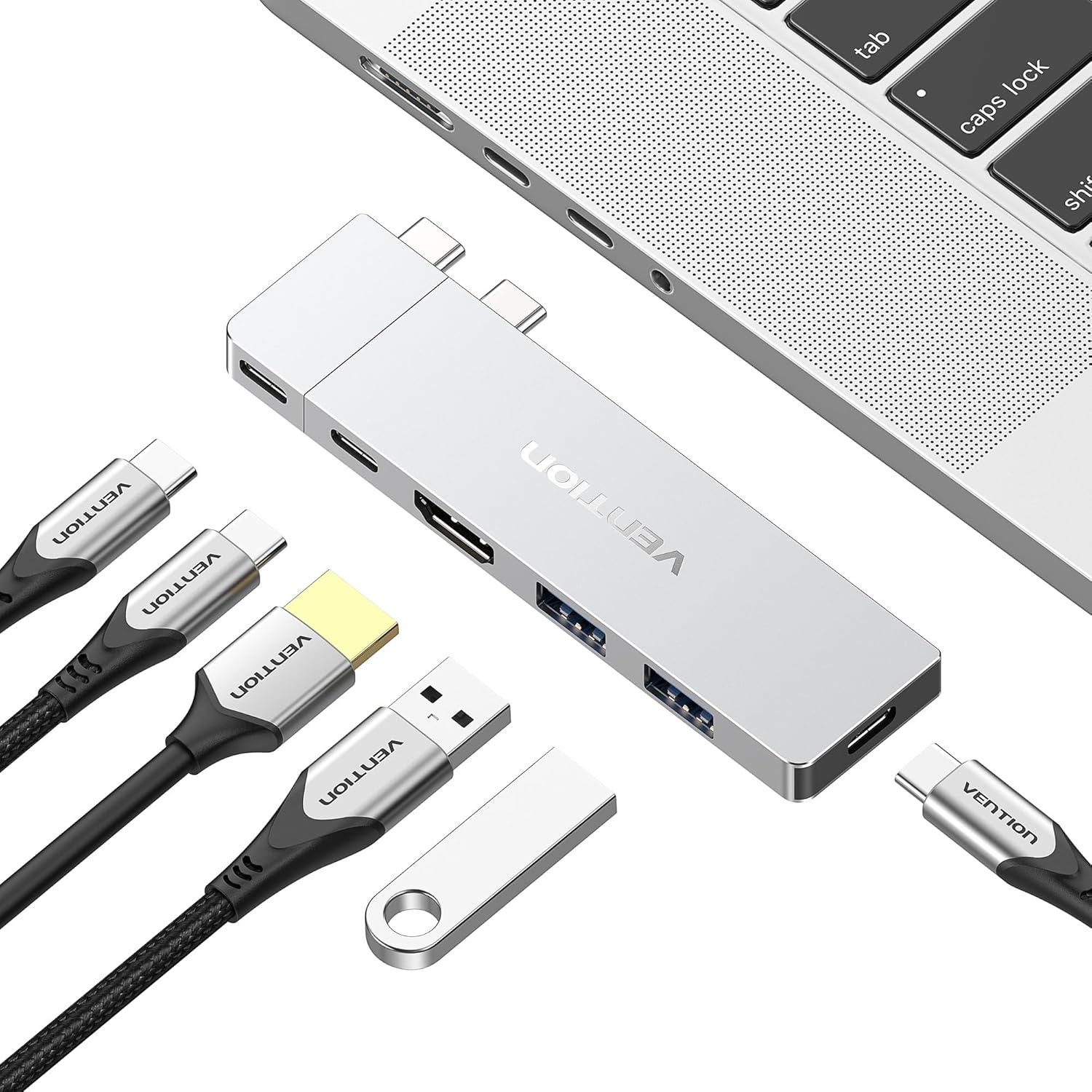
Choosing the right USB-C hub for your MacBook can significantly enhance your productivity and connectivity. With various options available, understanding your specific needs is vital in selecting the perfect hub. Whether you’re a creative professional, a business user, or someone who enjoys multimedia, the right hub can provide you with the versatility you require.
Understanding USB-C Technology
USB-C, the universal connector, offers impressive versatility, allowing for data transfer, charging, and video output through a single port. The technology supports high-speed data transfer rates, making it an excellent choice for transferring large files or connecting multiple devices. Before selecting a hub, ensure you understand the capabilities of USB-C and how they align with your MacBook’s specifications.
Not all USB-C ports are created equal. Some MacBook models support Thunderbolt 3, which provides even higher data transfer speeds and video output options. Familiarize yourself with your MacBook’s USB-C capabilities to choose a hub that maximizes these features, ensuring you get the most out of your setup.
Assessing Your Connectivity Needs
Consider the devices you frequently connect to your MacBook. Do you often use external displays, USB-A devices, or SD cards? Assessing your connectivity needs is crucial in determining the type of hub you require. A hub that supports multiple connections can reduce the hassle of plugging and unplugging different devices.
For example, if you regularly connect to external monitors, look for a hub that supports HDMI or DisplayPort outputs. Alternatively, if you work with cameras or other media devices, ensure the hub includes SD card slots. Knowing your needs will help you narrow down your options significantly.
Choosing the Right Number of Ports
The number of ports on a USB-C hub can vary widely. Some hubs offer just a couple of additional ports, while others provide a comprehensive array of options. Think about how many devices you typically use at once. A hub with more ports may be beneficial if you often connect various devices simultaneously.
Consider hubs that come equipped with multiple USB-A ports, HDMI outputs, and even Ethernet connections if you require stable internet access. For creative professionals, a hub with an SD card reader might also be essential. The right number of ports can streamline your workflow and minimize clutter on your desk.
Evaluating Speed and Performance
When selecting a USB-C hub, it’s essential to evaluate the speed and performance specifications. Look for hubs that support high data transfer rates to ensure smooth operation, especially if you are transferring large files or using high-resolution displays. A hub with USB 3.0 or higher capabilities can provide faster data transfer speeds than older USB standards.
Additionally, consider whether the hub supports power delivery (PD) charging. This feature allows you to charge your laptop while using the hub, which can be incredibly convenient during long work sessions. Checking the specifications for data transfer rates and power delivery capabilities will ensure you choose a reliable hub for your needs.
Design and Portability Considerations
The design and portability of a USB-C hub can greatly affect its usability. If you travel frequently or work in various locations, look for a lightweight and compact hub that easily fits into your bag. A sleek design can also complement the aesthetics of your MacBook.
Some hubs come with detachable cables or magnetic designs, which can provide flexibility in setup. A hub that’s easy to transport ensures you can stay connected wherever you are without sacrificing functionality or style. Consider your lifestyle when choosing the design that will best suit your needs.
Compatibility with Your Devices
Compatibility is key when selecting a USB-C hub. Though many hubs are designed to work with multiple devices, ensuring that the hub you choose is fully compatible with your MacBook and other peripherals is essential. Always check manufacturer specifications to guarantee seamless integration.
If you use a mix of devices, such as iPads or Android phones, consider a hub that offers universal compatibility. This will not only expand your connection options but also make it easier to work across different platforms. A versatile hub ensures that you can adapt to any situation without hassle.
Additional Features to Consider
Look for these additional features:
- Built-in SD card reader for easy media transfers
- Power delivery charging to keep your devices powered
- HDMI or DisplayPort for connecting to external displays
- Ethernet port for stable internet connections
- Durable construction for long-lasting use
These added features can enhance your user experience and provide additional functionality that may be essential for your work. Depending on your specific use cases, certain features can make a significant difference in how effectively you use your hub.
Price vs. Quality
While it can be tempting to opt for a cheaper USB-C hub, balancing price with quality is essential. Invest in a well-built hub from a reputable brand to ensure durability and performance. Cheaper hubs may not provide the same level of reliability, leading to potential connectivity issues or device damage.
Read through the specifications carefully and consider user feedback when making your decision. A hub that might be a bit pricier could save you hassle and serve your needs better in the long run. Prioritize quality to ensure you’re making a worthwhile investment.
Where to Start
To start your journey in selecting the right USB-C hub for your MacBook, visit HZ Computer in New York, New York. Our knowledgeable staff can assist you in identifying your connectivity needs and recommend a hub that fits your requirements perfectly. With a variety of options available, you’re sure to find the ideal solution for your MacBook.
Take the time to evaluate your specific use cases, and don’t hesitate to ask questions. The right USB-C hub can transform your MacBook experience, making it easier and more efficient to connect and work with all your devices. Start enhancing your setup today!
From our shelves
- VENTION 6-in-2 USB C Hub for MacBook Neo/Air/PRO, 80Gbps Detachable Magnetic 8K USB-C Dock with 4K@240Hz HDMI
- Replacement Power Cable Cord for 6 8 10 12 Port GaN Charging Station Hub
- SD Card Reader, 5 in 1 USB-C & USB Card Adapter with SD/MicroSD/MS and Dual USB-A Ports Memory Card Reader
Browse the Hubs, Docks and Card Readers range, or see everything in stock. Questions about what suits your setup? Talk to us or read the FAQ.